How to successfully implement an ATS in 2026
A successful ATS implementation doesn't just happen. It's the result of a plan that starts well before you go live.

Article
6 min
November 27, 2025
A successful ATS implementation doesn't just happen. It's the result of a plan that starts well before you go live.

With 382 ATSs listed on G2 right now, anyone who has been through the selection process knows how much time and energy it takes.
After demos, comparisons, internal alignment, and procurement, you want that decision to pay off, and implementation is the point where it starts to happen.
A solid implementation strategy is one of the biggest factors in whether your new ATS delivers the value you expect. The system, your hiring process, and your stakeholders all need to come together in a way that feels organized and intentional.
When that alignment is missing, teams feel the impact quickly. Projects slow down when configuration starts before the future hiring process is agreed on. Timelines move when key stakeholders join too late, or when decisions about data, permissions, or integrations take longer than planned.
It also takes more internal effort than many teams anticipate. One study found that almost 78% of ATS implementations run over budget or past their original timeline.
The good news is that these issues are preventable. When people, process, data, and technology stay aligned from the start, the system launches cleanly, and adoption becomes easier for everyone.
To make this guide as valuable as possible, we worked with Oriana Manda from HR Tech Consultants, Udder. Her experience supporting complex ATS rollouts helped shape the structure, recommendations, and templates included here.
This guide gives you a clear, practical way to run your ATS implementation so your team sees the value of your decision as quickly as possible.
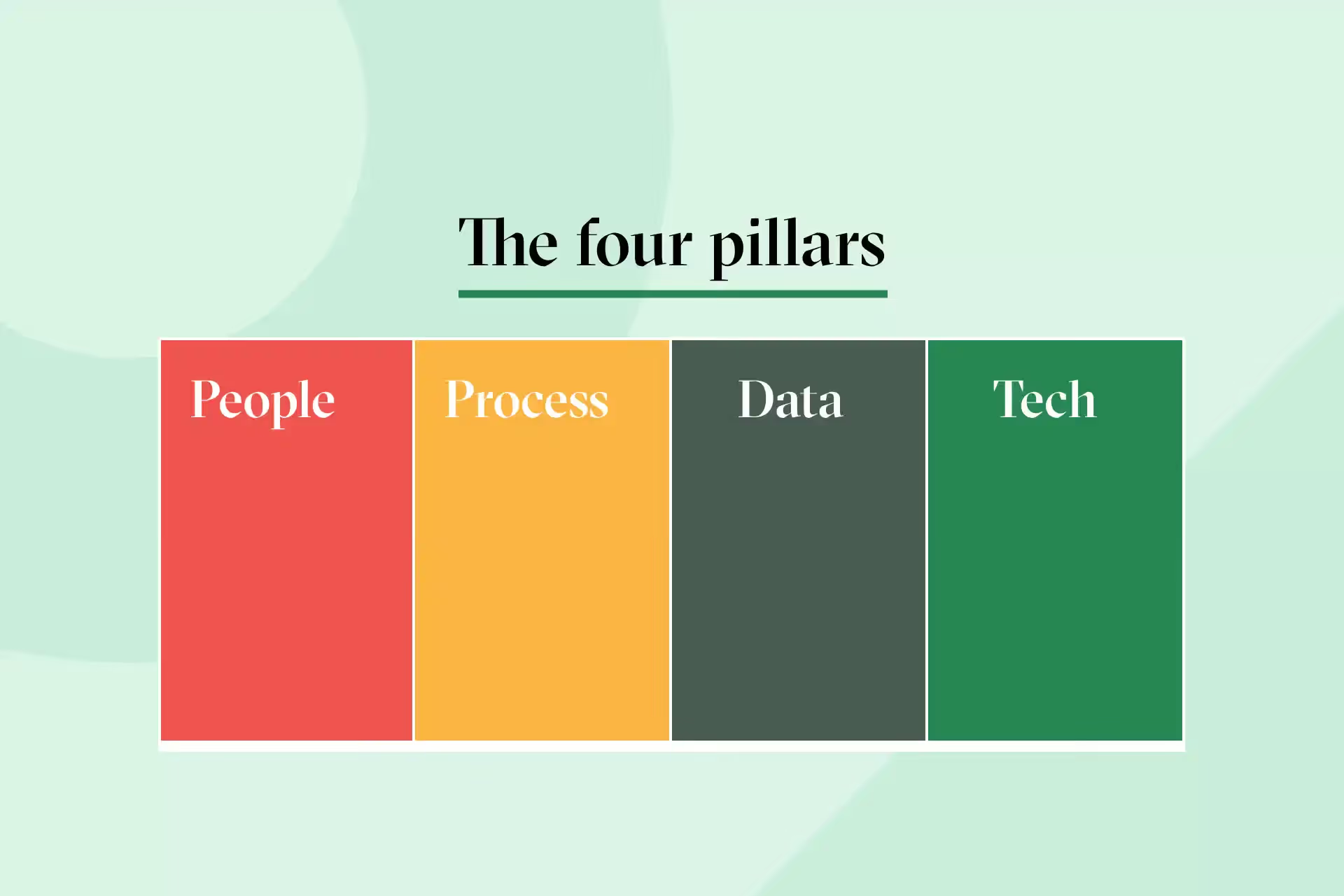
It’s easy to think of ATS implementation as a technical project, but the system is only one part of it. Your ATS implementation should give you a clear and reliable hiring process that reflects how your team works, not how the system works by default.
When we worked with Oriana to shape this guide, she emphasized how often teams assume the system should be the starting point.
In her experience, the most successful implementations begin with people and process, not configuration. The technology works best when it’s shaped around clear workflows, defined roles, and the decisions the business has already aligned on.
A strong implementation helps everyone understand their part in the workflow, supports clean data that’s ready for reporting and integrations, and creates a setup that’s much easier for people to adopt once you go live.
When you look at implementation this way, the structure becomes clearer. We see it as four key parts.
People
This includes everyone involved in hiring and every touchpoint they have. Recruiters, hiring managers, interviewers, HR, HRIS, and IT all shape how the system needs to work.
Process
These are the steps, handoffs, and approvals that take a request from submission to hire. This becomes the blueprint for configuration, which is why it needs clarity before anything is built.
Data
This covers what you collect, how long you keep it, what needs to move between systems, and what your reporting and compliance requirements look like.
Technology
Your ATS, your HRIS, and any integrations all sit here. The setup becomes much easier when the other three pillars are defined first.
An ATS works best when it’s configured around a process that already makes sense to the business. When teams jump into configuration before agreeing on that process, the system ends up supporting a mix of assumptions, preferences, and workarounds.
Mapping your future hiring process early helps everyone understand how the system should work, what it needs to support, and why certain decisions matter. It also sets up cleaner conversations, clearer configuration, and a smoother rollout. This is why the process map template is one of the core tools in this guide.
Once you understand the four pillars, the next part is the sequence of work.
Every ATS rollout moves through the same set of steps. The timing, level of detail, and number of people involved can vary, but the structure stays largely the same.
Understanding these stages early helps everyone know what to expect, what decisions need to be made, and where the project is likely to need the most attention.
“Your system should follow your process. If you start building before the process is clear, you end up configuring assumptions instead of decisions.”
Oriana Manda
Implementation Specialist at Udder
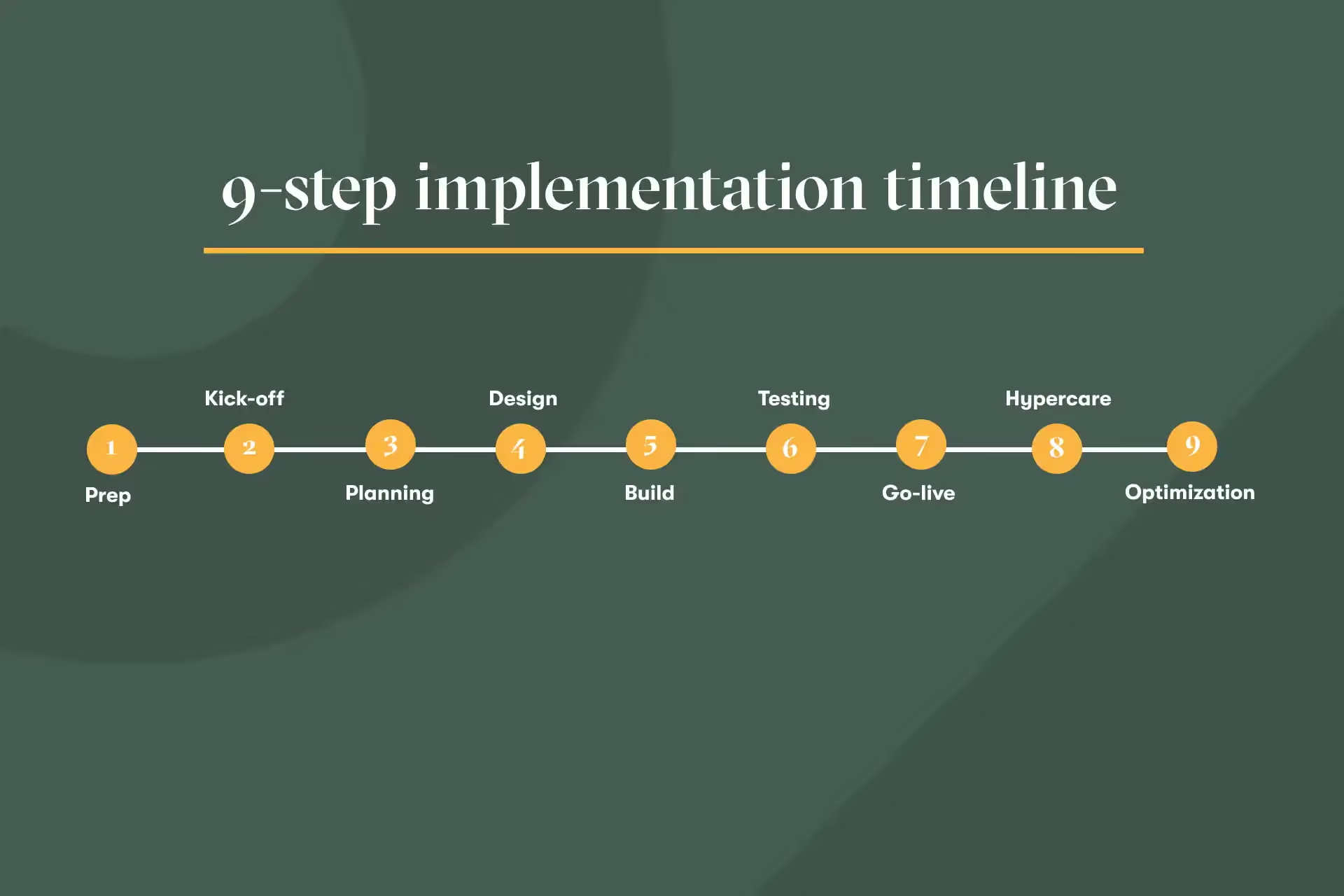
This is the period between signing your contract and officially starting the project. You gather your internal team, confirm who will be involved, understand their availability, and create initial alignment around goals, priorities, and timelines. Strong prep makes the kickoff smoother and avoids surprises later.
Kickoff brings everyone together. Your internal team, your vendor, and any partners join the same conversation to confirm scope, roles, responsibilities, and the overall plan. This is also where you agree on how you’ll communicate, how decisions will be made, and how progress will be tracked.
In this stage, you turn the information from the kickoff into a structured project plan. You define milestones, assign owners to tasks, outline dependencies, and set expectations for when each part of the work will happen. A clear plan helps teams manage workload and stay aligned.
Design is where you learn how the business hires today and how it should hire in the future. You explore workflows, approvals, handoffs, permissions, integrations, and data needs. This is the point where you map your future process, gather any existing templates or collateral, and make the decisions that shape your configuration.
Once the design is clear, you start configuring the system. You create requisition forms, workflows, templates, notifications, integrations, and permissions. This can be a straightforward phase when the design is strong, or it can involve iteration when new information surfaces. Build usually includes several workstreams happening at the same time.
Testing helps your team validate that the system works the way you expect. It includes writing test scenarios, choosing testers who weren’t involved in the build, and capturing issues in a structured way. Good testing catches gaps early and gives your team confidence before launch.
Go-live is the point where your organization starts using the ATS day-to-day. Before launch, you complete a readiness checklist, confirm access, finalize training, and make sure any integrations or data imports are complete. Early communication and clear support channels help this stage run smoothly.
The first few weeks after go-live often reveal small adjustments or optimizations. Hypercare provides space to resolve these quickly. Your team and your vendor stay closely connected so you can fix issues, refine configuration, and support new users.
Once the system has settled, you move into an ongoing rhythm of improvements. You refine workflows, adopt new features, clean up data, adjust templates, and continue aligning the system with how your organization evolves. Optimization is a continuous part of owning an ATS.
Once you understand the stages of an ATS rollout, it becomes easier to see the areas of work that run through several stages at the same time.
These are your workstreams. They help you understand where the project needs sustained attention rather than one-off tasks.
To recap:
A workstream is a group of related activities that appears throughout multiple stages.
For example, ‘testing’ starts long before you reach the testing step. You plan for it early, prepare scenarios during design, execute it during build, and follow up during go-live and hypercare.
The same is true for project planning, stakeholder alignment, and process design.
Seeing these patterns should make the implementation project easier to manage.
It helps you understand what needs ongoing attention, where decisions come from, and why certain parts of the work take more time than others.
These workstreams influence how smoothly the build comes together, how quickly decisions are made, and how confident your team feels at go-live.
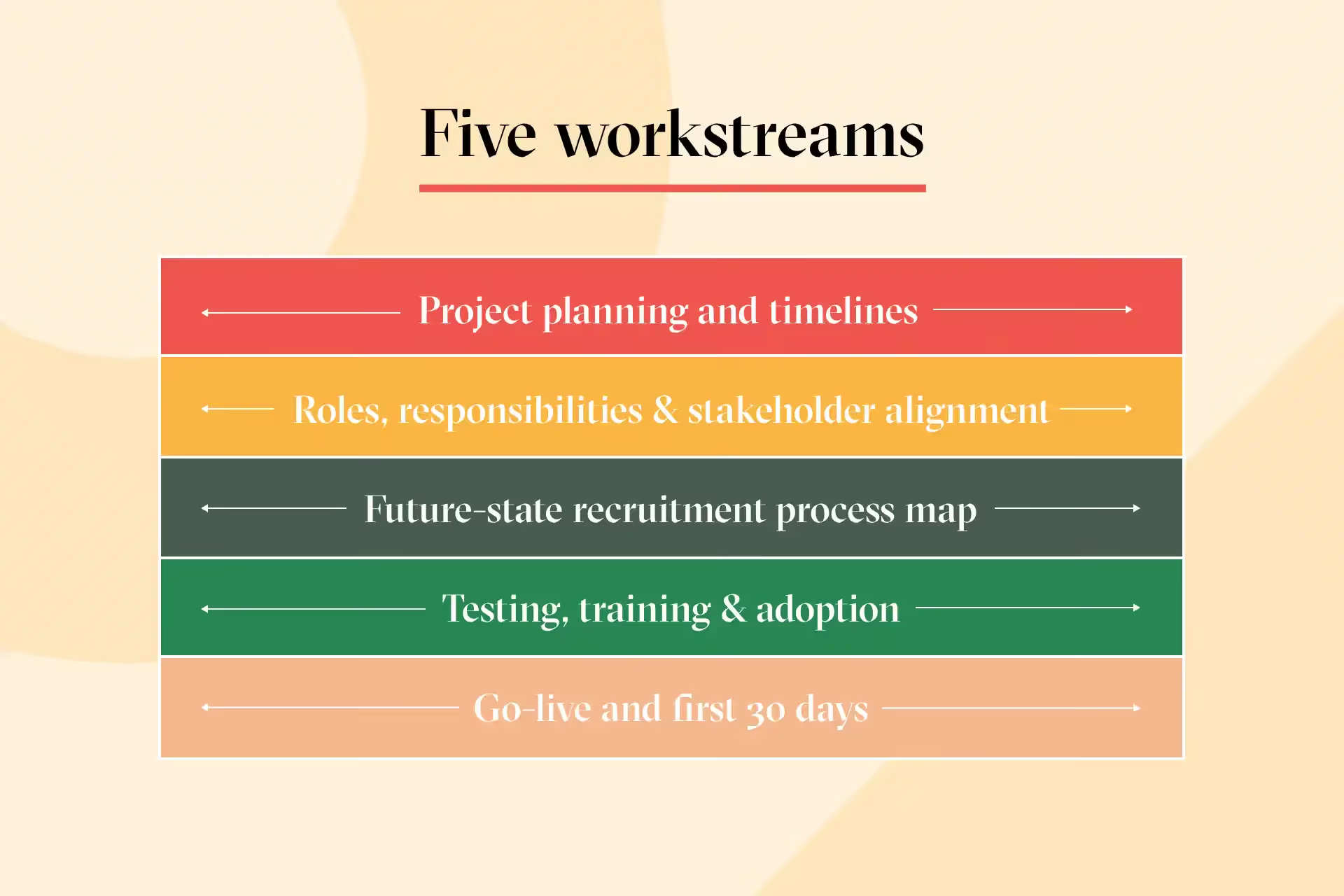
A strong plan gives you structure, visibility, and realistic expectations. Projects usually slow down when decisions take longer than expected or when internal workload isn’t accounted for early.
A useful plan includes:
💡 We recommend you use the ATS implementation project plan template as a starting point.
ATS projects involve a wide range of people, each with important input at different times. Clear ownership reduces delays and avoids rework.
Most implementations include input from:
💡 The roles and responsibilities template will help you with this section, so you set expectations early and keep the project moving.
This is one of the most important parts of the implementation, and the one that most teams underestimate. When the hiring process is clear, configuration becomes smoother, and decisions are easier to make.
Oriana stressed how often teams skip this step and regret it later:
“If the future process is unclear, the system ends up reflecting guesswork. Then you spend weeks fixing what should’ve been decided before build.”
A strong process map covers:
💡 Make sure you download our future state recruitment process map template to help you document all of this before anything is configured.
Testing gives your team early exposure to the workflow and helps you confirm the system works as expected.
Testing usually includes:
Oriana noted that testing quality often reflects how clearly the workflow was defined earlier. If testers struggle to follow the steps, it’s usually a sign that the process needs clarification before launch.
Training and adoption are easier when:
The final week before launch brings together the last pieces of the project.
Go-live preparation usually includes:
The first 30 days are your hypercare period, where you respond quickly to questions, refine configuration, and support early adoption.
Our downloadable go-live readiness checklist will help you stay organized.
Most ATS implementation challenges come from a small set of patterns. When you know what to look out for, it’s much easier to prevent delays, rework, and unnecessary frustration. These are the issues teams encounter most often, along with simple ways to avoid them.
Some teams try to rebuild their previous ATS inside the new one. This usually carries over the same problems they were trying to solve. A fresh system works best when it’s shaped around a clear, updated hiring process, not old habits.
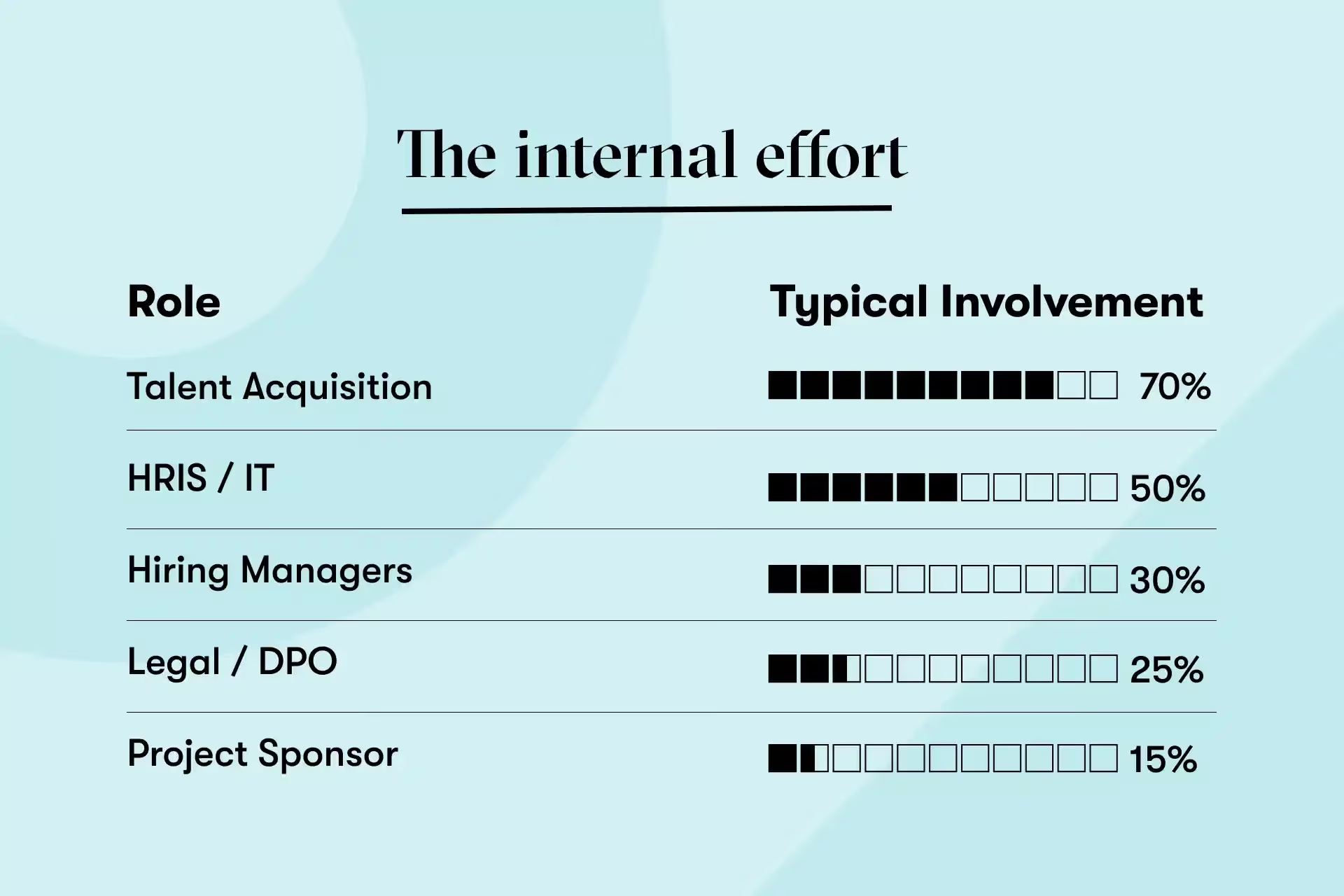
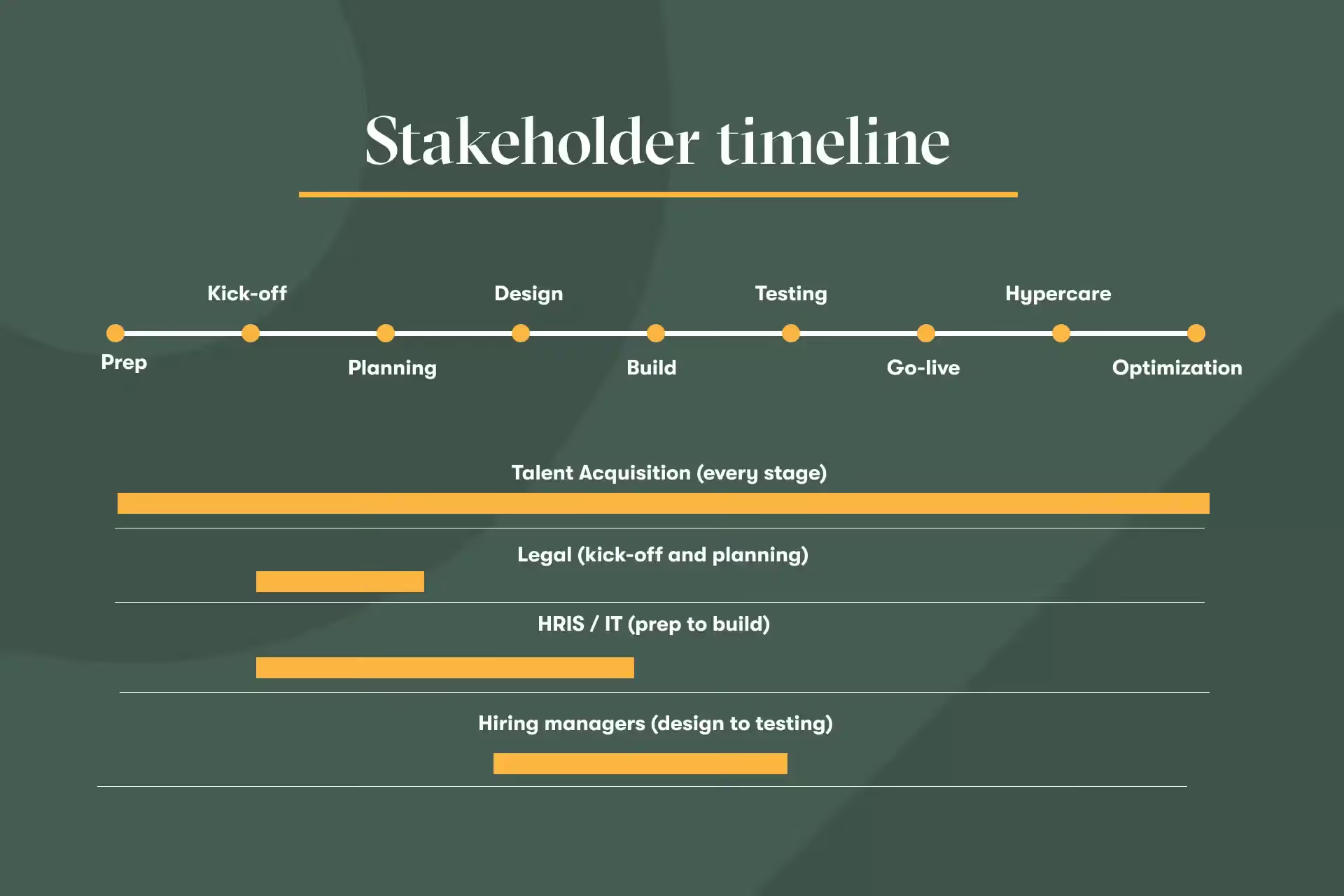
Implementation takes time from talent acquisition, HR, HRIS, IT, and legal. When teams only plan for vendor involvement, the project slows down.
You can avoid this by mapping who needs to be involved at each stage, estimating how much time they’ll spend, and confirming their availability before the project begins. A clear roles and responsibilities matrix helps you set realistic expectations and keep momentum steady.
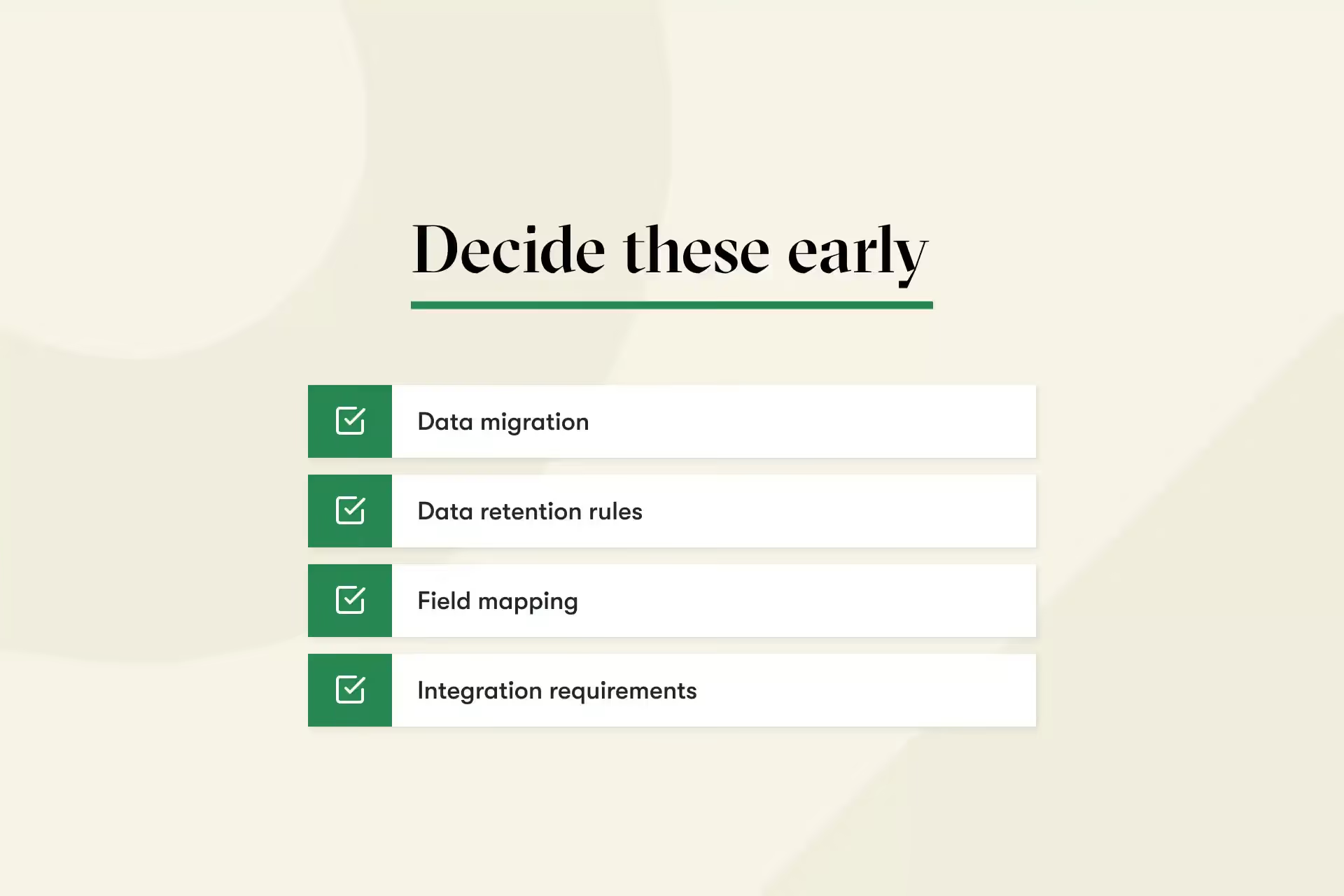
Data migration, data retention, field mapping, and integration needs become harder to solve when they’re addressed mid-build. Planning these early avoids rework later.
It’s tempting to click around the system and configure as you go. This creates gaps in workflows and inconsistent logic. A clear future-state process map keeps the build phase focused and predictable.
Testing is where the real workflow becomes visible. When testing is rushed or incomplete, issues appear after launch, when they’re harder to manage. Structured test scenarios help teams catch problems early.
Approvals, compliance decisions, data retention rules, and system access often sit with teams outside TA. When they join late, decisions stall. Early involvement helps everything move faster.
Go live is the start of real usage, not the end of the project. The first month brings small adjustments and opportunities to improve. A simple hypercare plan helps those changes land smoothly.
“If you skip process design, you end up rebuilding your ATS twice.”
Oriana Manda
Implementation Specialist at Udder
A good ATS implementation is a shared effort. The vendor brings the product knowledge, and your team brings the hiring context, decision-making, and the understanding of what the organization needs.
When both sides communicate clearly and work from the same expectations, the rollout becomes much easier to manage and adopt.
Asking the right questions early helps you understand what to expect from your vendor’s implementation approach.
Useful questions include:
These questions help you understand how well the vendor’s approach fits your organization.
Once the project starts, clear questions help you stay aligned and avoid surprises:
An ATS implementation has many moving parts, but each stage builds on the one before it.
When your team understands what’s coming, who owns each decision, and how the process fits together, the rollout becomes smoother and easier to manage.
A strong implementation gives you:
If you’re ready to put this guide into practice, our downloadable implementation toolkit offers four templates to help you plan your project, define responsibilities, map your future process, and prepare for a clean go-live.
With over seven years in B2B SaaS, Alice creates data-driven content that makes complex topics simple and engaging. She believes every good story (no matter how dry or technical) should feel human, useful, and built on insight.